
Introduction to Fields, Constructors, and Methods
Fields
A Java class defines what objects of the class know (fields) and can do (methods). The class also defines how to initialize the fields when the object is first created (constructors). Fields hold the data for an object. Fields record what an object needs to know to do work in the program. Fields are also called instance variables or object variables or properties. A fields can be declared public or private. as like your diary. Only you should have direct access to it. In this case private means that only the code in this class can directly access the field values.
Accessing fields:
Accessing a field in an object is done using the dot modifier ‘.’
For example, if we had an object called book that contains these fields:
String title;
String author;
int numberOfPages;
To access the title field you would use
book.title
This expression is just like any other string, which means you can either store it in a string variable:
String myBookTitle = book.title;
Or use it directly as a string itself and perform operations like printing it:
System.out.println(book.title);
Setting Fields
You can also change a field’s value. Say you want to set the number of pages in a book to 234 pages:
book.numOfPages = 234;
In the image below, the Person class declares two fields: name and cell. Name is the person’s name and cell is their cell phone number. These are both things that you might need to know about a person.

Example of field declarations in the following class:

Constructors
Constructors don’t actually construct the object. The class makes the object and then executes a constructor to initialize the values of the fields (instance variables). Constructors are specified after the fields and before any methods. They typically start with public and then the name of the class. They can take data (specified in parentheses) which is used to initialize the fields.
The Person class has one constructor that takes two values: a string that is the name and a string that is the cell phone number. To find a constructor in a class look for something with the same name as the class and no return type.
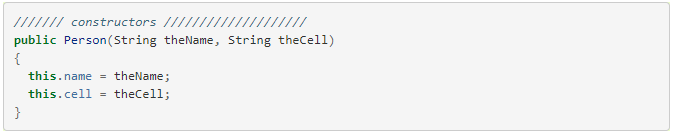
The constructor parts in this class:

Methods
Methods define what an object can do or the behavior of the object. They are specified after the constructors and typically start with public then a type, then the name of the method. They can take data as input which is specified in parentheses.
You might have also noticed that running actions in objects look very much like calling a function. That’s because that’s exactly what it is.
Methods in Java are functions that belong to a particular object. When we get to creating our own object types later in this lesson we will be creating methods the same way we used to created functions.
Calling a method
To use a method you call it (just like calling a function). This is also done using the dot modifier .
Methods, just like any function can also take in arguments. For Example: Assume that our book object has a method called setBookmark that takes the page number as a parameter:
void setBookmark(int pageNum);
If you wanted to set a bookmark at page 12, you can call the method and pass in the page number as an argument:
book.setBookmark(12);
The Person class below has methods for getting the name and cell phone and for setting the cell phone. Methods that get information from an object are called getters or accessors. Methods that set field values are called setters or mutators.

The method parts in this class:
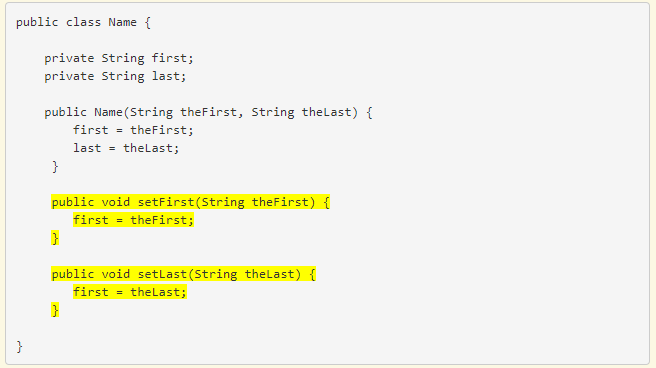
Summary
Fields, Constructors, and Methods together are what make an object useful, fields store the object’s data, constructors initialize those fields, and the methods perform actions to use or modify those data.
However some objects might have no fields and are just made up of a bunch of methods that perform various actions.
Other objects might only have fields that act as a way to organize storing data but not include any methods!
 The World of Java